Intimatte Font: Elevating Web Design with Script Elegance
I was recently tasked with refreshing the homepage of a boutique coaching website. The client wanted a look that felt approachable yet premium, moving away from the sterile, corporate aesthetic that dominates so many SaaS landing pages. I needed a typeface that could carry the emotional weight of her brand story without sacrificing legibility on mobile devices. That is when I pulled Intimatte into my design toolkit. As a gorgeous script font, it promised the detailed craftsmanship I needed, but I had to see how it performed in a live, responsive environment before committing to it as the primary display font for the project.
Testing Intimatte in a real web layout revealed its true potential. It is not just a static image; it is a dynamic asset that interacts beautifully with whitespace and modern typography. This review explores how this highly detailed script font can transform digital experiences, from hero sections to social media graphics, while maintaining the technical standards required for professional web design.
Visual Personality and Digital Appeal
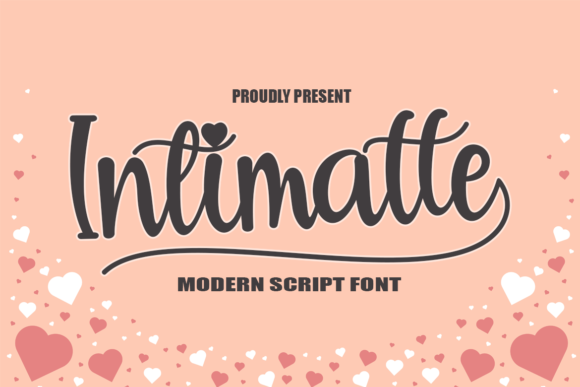
Intimatte possesses a distinct visual personality that bridges the gap between traditional calligraphy and modern digital aesthetics. The strokes are neatly crafted, offering a fluidity that feels handwritten yet controlled. In a digital context, this translates to a sense of authenticity. When users land on a page featuring Intimatte, they immediately perceive a human touch, which is crucial for building trust in online businesses, especially for coaches, artists, and boutique store owners.
The mood of this typeface is warm and inviting. Unlike rigid sans serif fonts that can feel cold or overly technical, Intimatte brings an emotional layer to the interface. It works exceptionally well for brands that want to convey sophistication without appearing distant. Whether used for a wedding invitation site or a high-end product landing page, the font’s charm enhances the overall brand identity, making the digital space feel more like a curated experience than a generic template.
Strategic Placement in Web Layouts
One of the most critical decisions in web design is determining where a decorative font belongs. Through my testing, I found that Intimatte shines brightest when used sparingly as a display font. It is ideal for hero section headlines, where it can capture attention immediately. For example, placing a short, impactful phrase like "Design Your Dream Life" in Intimatte against a clean, minimal background creates a powerful focal point.
However, readability is paramount. I avoided using Intimatte for body copy, navigation menus, or form labels. Its intricate details, while beautiful, can become illegible at smaller sizes or on lower-resolution screens. Instead, I paired it with a clean sans serif font for all functional text. This contrast ensures that the user can scan information quickly while still enjoying the aesthetic appeal of the script. The hierarchy becomes clear: Intimatte for emotion and emphasis, the sans serif for clarity and action.
- Hero Headers: Perfect for large, impactful titles that set the tone.
- Testimonial Quotes: Adds a personal, authentic feel to customer reviews.
- Section Dividers: Use short words like "Welcome" or "Services" as decorative elements.
- Call-to-Action Buttons: Only if the button text is very short, such as "Join" or "Start."
Responsiveness and Mobile Considerations
A major concern when using any script font in web design is how it renders on mobile devices. Intimatte performed surprisingly well, but it required careful adjustment. On desktop, the ligatures and swashes add a layer of sophistication. On mobile, however, these details can sometimes clutter the view if the font size is too small. I found that increasing the line height and ensuring ample padding around the text helped maintain its elegance without compromising usability.
For responsive layouts, I recommend using media queries to adjust the font size dynamically. What looks balanced on a 27-inch monitor might feel cramped on a smartphone screen. By scaling Intimatte down slightly and simplifying the surrounding layout on mobile, the font remains a delightful accent rather than a readability hurdle. This attention to detail ensures that the brand experience is consistent across all devices, reinforcing professionalism and care.
Enhancing Brand Consistency Across Digital Assets
Beyond the website itself, Intimatte serves as a versatile asset for broader digital branding. I tested it in social media graphics, email headers, and digital ad banners. The font’s consistency helps reinforce brand recognition. When a user sees the same distinctive script in an Instagram story, a newsletter subject line, and the website header, it creates a cohesive visual narrative. This consistency is key to building a memorable brand identity in a crowded digital marketplace.
For course creators and digital product sellers, Intimatte can elevate the perceived value of their offerings. Using it on sales page headers or certificate templates adds a touch of prestige. It signals that the content is curated and thoughtful. However, it is essential to check the commercial font licensing before using it in client projects or for selling digital templates. Ensuring you have the right permissions protects both your business and your clients from legal issues.
Pairing and Technical Implementation
To maximize the impact of Intimatte, pairing it correctly is essential. I experimented with several combinations and found that a geometric sans serif font provides the best balance. The simplicity of the sans serif allows the intricate details of the script to stand out without competing for attention. Alternatively, a classic serif font can create a more editorial, magazine-like feel, suitable for lifestyle blogs or portfolio sites.
From a technical standpoint, ensure you are using the correct file formats for web implementation. WOFF2 files are generally preferred for faster loading times, which is crucial for SEO and user experience. Check if the font package includes various weights or styles, although script fonts often come in a single regular weight. If alternates or ligatures are available, use them judiciously to avoid repetitive patterns that might look artificial.
Ultimately, Intimatte is a powerful tool for web designers who want to inject personality into their layouts. It is not a utility font for dense data or complex interfaces, but for creating emotional connections and highlighting key messages, it excels. By respecting its limitations and leveraging its strengths, you can create digital experiences that are not only functional but also deeply engaging and visually stunning.